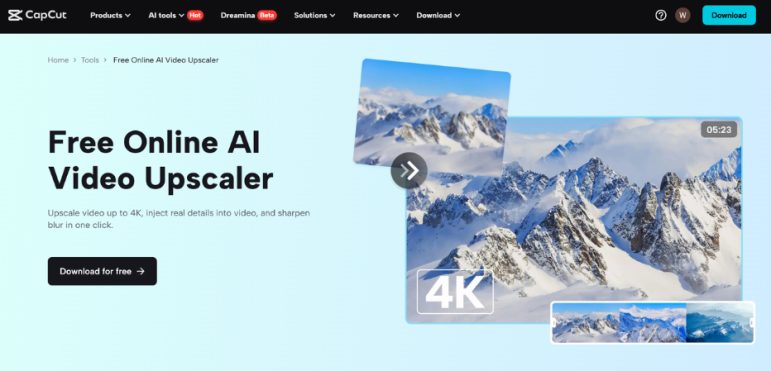
Creating videos today is easier than ever before. Thanks to new AI tools, content creators can make videos faster, better, and cheaper. Whether you post on YouTube, TikTok, or Instagram, high-quality videos help you stand out and grow your audience.
But not every video is perfect from the start. Sometimes, you record in low resolution or use old clips. These videos might look blurry or pixelated on today’s high-resolution screens. That’s where AI video upscalers come in. They use smart technology to make your videos clearer and sharper.
Also, many creators now use other AI tools to save time. One great tool is the AI voice generator. It lets you turn written text into lifelike voiceovers. This helps creators who don’t want to record their own voice or need different voice styles.
What Is an AI Video Upscaler?
An AI video upscaler is a tool that improves the quality of your video. Instead of simply stretching the image (which can look bad), it uses artificial intelligence to “fill in” missing details. This makes the video look sharper, cleaner, and more professional.
AI upscalers are trained on large amounts of video data. They learn how high-quality videos look, and then apply that knowledge to their low-quality video. The result is a much better-looking version of the same video, without having to re-shoot anything.
You can use an AI video upscaler to:
- Upgrade older or low-resolution videos
- Make content ready for 1080p or 4K screens
- Improve the viewing experience for your audience
Why Content Creators Use AI Video Upscalers
Content creators are always looking for ways to save time and improve quality. Shooting everything in 4K is not always possible. Maybe you filmed something years ago with an old camera, or you only have a low-resolution clip available.
With an AI video upscaler, you don’t have to throw those videos away. You can make them look almost new. The AI adds details and sharpness that would be hard to do manually.
Here’s why creators love using AI video upscalers:
- Faster than editing by hand – No need to adjust each frame or filter
- Saves money – No need to buy new equipment or hire editors
- Great for all platforms – You get clean videos that look great on phones, computers, and big screens
It’s an easy way to improve your video quality without needing high-level editing skills.
How to Use CapCut’s AI Video Upscaler (Desktop)
CapCut is a popular video editing tool. It’s free and easy to use. It also comes with smart AI features, like the video upscaler.
If you want to use CapCut’s AI video upscaler on desktop, just follow these 3 simple steps:
1. Import video
Open CapCut and upload the video you want to improve. You can drag and drop the file or choose it from your computer.
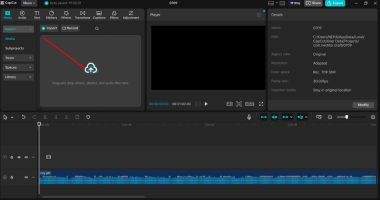
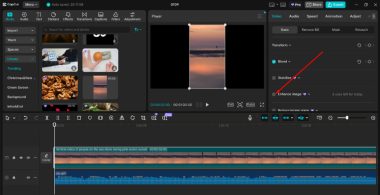
2. Convert AI video upscaler
Click on the “Video > Basic” tab, and select “Enhance Image.” Choose your desired definition, like UHD or HD. CapCut will automatically start enhancing the video using AI.
3. Export video
When it’s done, click “Export” to save the enhanced video to your computer.
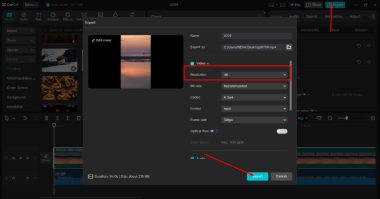
You now have a high-quality video, ready to post or share.
More Than Just Video: Other AI Tools for Creators
AI video upscalers are powerful, but they’re not the only helpful tools for creators. Many people also use AI to create voiceovers, sound effects, and background music.
One useful tool is the text to speech AI. With it, you can type words and turn them into natural-sounding voices. This is perfect for:
- Explainer videos
- Tutorials
- Narrations
- Videos in multiple languages
You don’t need a microphone or studio. Just type your script, pick a voice, and generate your audio.
Using a text to speech AI tool like CapCut’s can help you work faster and keep your content sounding professional.
How AI Tools Work Together
AI video upscalers are just one part of a bigger system. When combined with other tools, you can make entire videos with little effort. Here’s how creators are using AI together:
- Upscale a low-res video
- Generate voiceovers using an AI voice generator
- Add narration with text to speech AI
- Edit and export everything in one place, like CapCut
This workflow helps small creators produce high-quality content without needing a full team or expensive software.
The Future of Video Creation
AI is changing how we make videos. In the past, you needed a good camera, editing skills, and voice talent. Today, AI tools let almost anyone create polished videos quickly.
Tools like CapCut’s AI video upscaler, AI voice generator, and text to speech AI give you everything you need.
As more people start using these tools, we’ll see better videos everywhere — not just from big brands, but also from small creators, students, and hobbyists.
Final Thoughts
If you’re a content creator, using AI tools can save you time, money, and effort. Whether you’re fixing an old video, adding a voiceover, or making your content more professional, AI is here to help.
Start with simple tools like CapCut’s AI video upscaler, and then explore more. Try the AI voice generator for voiceovers, or the text to speech AI for narrations. You don’t need to be a tech expert — just open the app, follow a few steps, and you’re done.
Give it a try and see how AI can take your videos to the next level.